








For macOS
Export your Mac and iCloud contacts to CSV, Excel, Outlook, and other formats. Complete privacy, no subscription.

Apple's Contacts app explained
Understanding how Apple's Contacts app structures and organizes data is the key to working efficiently with Exporter for Contacts. As you may already know, for certain contact fields, Apple's Contacts app allows you to enter an unlimited number of different values per contact. These multi-value fields can be tagged with pre-defined labels, some field types can even have custom labels that you define.
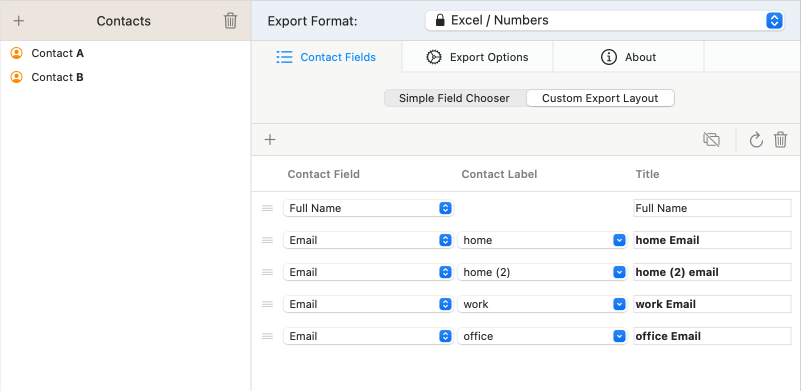
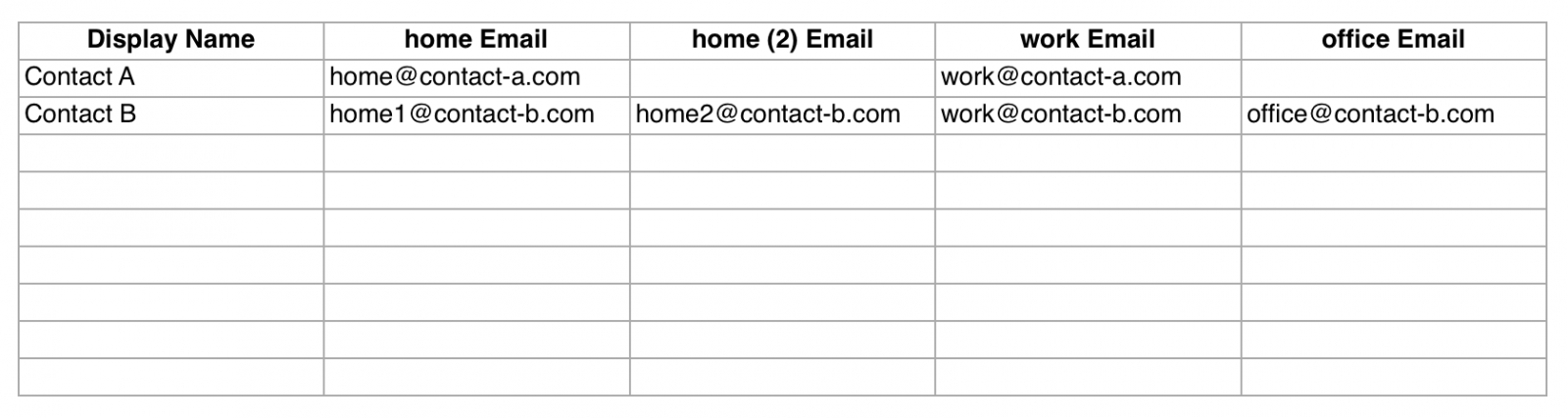
For example, contact A can have two email addresses of type “home” and “work”. Contact B can have two of type “home”, one of type “work” and one with a custom label such as “office”. The same applies to many other fields: a contact can carry as many street addresses, phone numbers and so on as you like.


CSV and Excel files store data in rows and columns, a so-called two-dimensional table. When exporting contacts data to these formats, Exporter for Contacts needs to transform the flexible structure of Apple's Contacts app into the rigid grid of that table. In this grid structure, a row represents a contact, while a column represents a field type of a certain label.
As a consequence, when exporting email addresses, you have to tell Exporter for Contacts which email types you want to include in the export. For each email address/label combination that you specify in the export layout, a separate column in the Excel file will be created. If a contact has no email address of type “work”, the corresponding Excel cell stays empty.
Conclusion
Converting iOS and macOS contacts to an Excel or CSV file is less trivial than it looks. The more contacts you have, and the more different labels their fields carry, the more columns a straight export produces. Fortunately, Exporter for Contacts has features on board that can combine data. Two features bring clarity to your Excel export. One is the multivalue export mode in the Simple Field Chooser. The other is the set of special labels “Labeled List/Unlabeled List” and “1st” to “10th” in the Custom Export Layout Editor.